If two people playing one digital piano is your plan — a parent and a child, a teacher and a student, or two friends trying four-hand music — one instrument can work, but only in the ways that model actually supports.
This guide stays with The ONE’s current catalog. It separates three different ideas that often get mixed together: sitting side by side on a full 88-key piano, using split mode to divide the keybed, and plugging in two sets of headphones. Not every model does all three, and two headphone jacks do not, by themselves, create two teaching registers.
The short answer for two people playing one digital piano
Two people can share one digital piano, but the setup depends on the model. An 88-key instrument gives you the most physical space for four-hand music. Split mode, when a model actually offers it, divides the keybed into zones for a teacher and a student or a parent and a child. Two headphone outputs let two listeners practice quietly, which is a different feature from split or duet.
The current The ONE range is not uniform on those points. Home 88-key consoles are the realistic starting point for side-by-side playing. Some current models are documented with two headphone jacks of different sizes. A 61-key portable is easier to move, but it is a tight shared keybed and may have only one headphone socket. Confirm the live product page, and use the existing split-mode and dual-jack model guide rather than assuming every smart piano behaves the same.
This page will not invent a confirmed Twin Piano or same-register teaching mode for current The ONE models. Current specification pages, as reviewed in that model guide, do not confirm that Split creates two identical teaching registers. If you need quiet practice for two listeners, start with the two-headphones setup guide after you have checked the jacks on the instrument you own or plan to buy.

Side-by-side and four-hand playing on a full 88-key piano
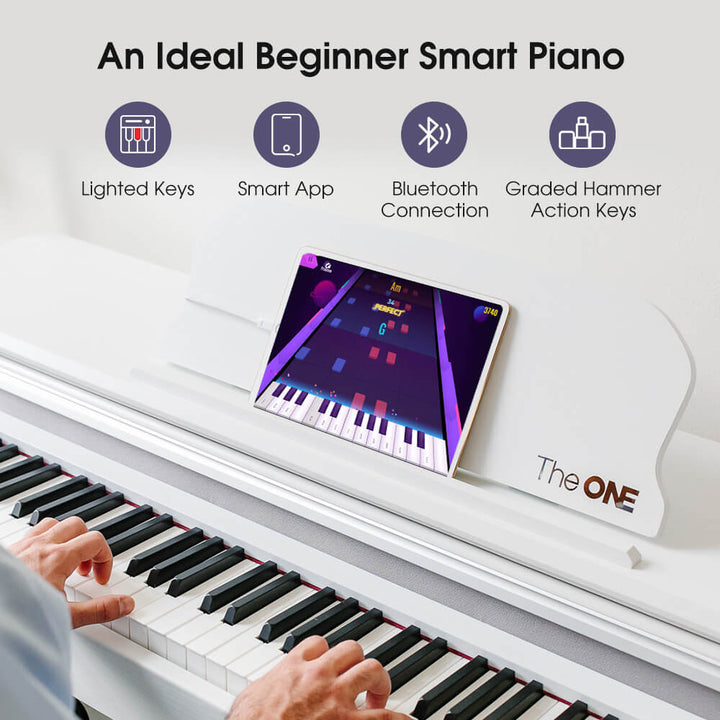
Four-hand music is the oldest way two people share one piano: you sit together and split the range by courtesy, not by a menu. A full 88-key instrument gives you more physical room than a 61-key portable, which matters when four hands need space to land without bumping. Official FAQ wording says all of TheONE 88-keys Smart Pianos have full weighted keys, so the shared instrument still feels like a piano under both players’ hands.
Seating is the practical limit that photos can hide. The official Sing Pro photo below shows an 88-key setup with a music rest, a tablet, and a single bench. That bench is for one player, or for two people perched more closely than a duet bench would allow. This catalog page does not publish a duet-bench width or a dedicated four-hand seating accessory, so plan for enough shared seating width rather than assuming the included bench is built for two.

Courtesy still matters more than any feature name. Agree who takes the lower part, keep wrists from colliding in the middle octaves, and take turns when the arrangement is not actually four-hand writing. If you are sharing a home with other people, decide whether you will use speakers or headphones before you start, so the second player is not left guessing about volume. Side-by-side playing does not require split mode, and it does not require two jacks — it only requires enough keys, enough seating, and a little patience.
Split mode for a teacher, a student, a parent, and a child
Split mode, when a keyboard offers it, divides the keybed into zones so two people can play in different ranges at the same time, often for a short teacher-and-student or parent-and-child lesson. It is not the same thing as sitting together for four-hand music, and it is not the same thing as plugging in two headphones. Layer, Twin Piano or duet, and dual jacks are also different features, even when marketing copy uses those words loosely.
On current The ONE specification pages, a confirmed “teaching twin” that copies the same register for both players is not documented. The existing model article reviews official copy for current TOP1X and TOP2 products and notes that the pages do not provide enough detail to confirm that Split creates two identical teaching registers. This page will not invent an on-instrument menu name or a hidden same-register mode to fill that gap. If split behavior matters to your lesson plan, read the model guide, then confirm the live product page or ask support@theonemusic.com before you buy around that feature.
A parent and child can still share an 88-key piano without split mode by taking turns, sitting side by side, or using headphones for quiet practice. Split is a convenience when a model actually has it, not a requirement for shared practice. For the model-by-model detail, use the guide to which smart piano keyboards have split mode and dual headphone jacks instead of repeating that inventory here.
Shared headphones and dual jacks
Two people can listen at once when the instrument has two usable headphone outputs, or when you have a documented adapter setup that the model actually supports. Two jacks still do not create two teaching registers. They only give two listeners a quiet path off the speakers. If your goal is a silent lesson in an apartment, start by checking the jack count and jack sizes on the exact model, then follow the existing two-headphones guide for the setup itself.
Current official copy reviewed in that guide for TOP1X and TOP2 describes one 6.5 mm jack and one 3.5 mm jack, not two matching 3.5 mm jacks. You may need a simple plug adapter if both of your headsets use the same size. Speaker muting and independent zone routing remain points to verify on the model you have. A previously cited official FAQ says sound comes through the headphone or amplifier when one is connected; still test the exact instrument, because the second jack and the speaker behavior are easy to assume and easy to get wrong.
The official TheONE Headphone for Smart Piano and Smart Drums is compatible with The ONE smart pianos and smart drums, with soft ear cushions and adjustable earcups. Buying two headsets does not add a second jack to a portable that only has one. For cable routing, adapters, and what to check when only one person can hear, use the guide to connecting two headphones to a digital piano rather than repeating those steps here.
When two pairs of headphones are better than speakers in an apartment
Two headsets beat speakers in a thin-walled apartment.
Speakers fill the room when the household wants to listen, but two headphone outputs keep a shared lesson from traveling through the floor or a shared wall at night, when volume would otherwise become the first complaint.
Headphones also make it easier to take turns without one person playing at living-room volume for the other. The useful limit is the instrument, not the headsets. If the piano has only one headphone socket, two listeners cannot both plug in directly. If it has two jacks of different sizes, plan the adapters before the lesson starts. If you connect only one headset, listen for whether the speakers mute, because official FAQ wording says sound comes through the headphone or amplifier when one is connected, and you should still confirm that behavior on your model.
Keep a low speaker volume for daytime shared playing, switch to headphones when the building is quiet, and do not assume a second person can lean in and hear a useful mix from one earcup. None of that requires a special duet mode; it requires two working outputs, two comfortable headsets, and an agreement about when the speakers stay off. Organizations such as MTNA publish general teaching resources, but they do not specify how a particular digital piano routes its headphone jacks.
What a 61-key portable can and cannot do for two players
Two players will find a 61-key board tight.
You can still take turns at the same portable, but there is far less shared physical space than on a full 88-key piano, and a compact 61-key model may have only one headphone jack rather than two.
A 61-key layout is a practical travel and small-room size, and official Early Black Friday wording on the store notes that 61 keys cover many pop songs, chords, and beginner pieces. It is not a comfortable four-hand instrument. Two adults sitting side by side will run out of elbow room, and even a parent and a child will feel the missing lower and upper keys if they try to share the range at the same time. Taking turns is the honest use case.
Do not assume a portable has dual jacks or a teaching split just because a home console might. The official brief for The ONE COLOR records a single 3.5 mm headphone socket, and tonight’s product description does not add a second jack. COLOR is a 61-key keyboard officially described as weighted just 7.7 lbs and powered by AA batteries, with Bluetooth to iOS and Android apps. That makes it easy to move, not easy to share as a two-player stage. If two quiet listeners matter as much as portability, step up to a current 88-key model whose jack layout you have checked, or accept that the 61-key instrument is a take-turns piano.
Practice manners: volume, turns, and app profiles when two learners share one instrument
Shared practice works better when you agree on volume, turns, and whose app account is signed in before anyone sits down. Speakers need a household-friendly level. Headphones need two working outputs if both people will listen at once. Turns should be short enough that the second player is not left waiting through a long, unstructured session. Those manners do not require a special product mode.
If you use the official Smart Piano app, do not invent a family profile system that the software does not offer. Official FAQ wording says: “Currently, Smart Piano do not support setting up multiple sub-profiles under one shared account. However, you can easily log out and switch between different accounts on the same device.” Two learners who want separate progress should use separate accounts and switch by logging out. Official FAQ wording also says the piano can be played without the app, so a second player can still use the keys, speakers, or headphones while the other person’s account is signed out.
Keep the lesson simple. One person plays, the other listens, then you swap. If you use split mode on a model that has it, agree who owns each zone before you start. Independent teachers and technician groups such as NAMM and the Piano Technicians Guild can help you think about practice habits in general; they do not configure The ONE’s app accounts or jack layout. If you are still choosing an instrument, shop from the official product pages rather than a look-alike listing, and use the FTC’s online shopping advice when you compare return terms and seller details.
FAQ
Can two people play one digital piano at the same time?
Yes, in more than one way, and not every model supports every way. Two people can sit together on a full 88-key piano and play four-hand music, they can use split mode if that model actually offers it, or they can listen through two headphone jacks when the instrument has two usable outputs. Those are different features. Two jacks do not create two teaching registers, and current The ONE specification pages do not confirm a Twin Piano or same-register teaching mode. Check the exact model, then use the existing split-mode and two-headphones guides for the details.
Does every The ONE model have two headphone jacks?
No. Jack layouts vary by model, and you should not assume a portable matches a home console. Current official copy reviewed for TOP1X and TOP2 describes one 6.5 mm jack and one 3.5 mm jack, not two matching 3.5 mm jacks. The official brief for the 61-key COLOR keyboard records a single 3.5 mm headphone socket. Buying two official The ONE headsets does not add a second jack. For setup steps, adapters, and speaker-muting checks, use the existing two-headphones guide and confirm the live product page for the instrument you own.
Is split mode the same as duet or Twin Piano?
No. Split, Layer, Twin Piano or duet, and two headphone jacks are different features, even when casual copy uses those words as if they were interchangeable. Split, when a keyboard offers it, divides the keybed into zones. Two jacks only give two listeners a quiet path off the speakers. On current The ONE specification pages, a confirmed teaching twin that copies the same register for both players is not documented. Read the existing split-mode model article, then confirm the live product page or email support@theonemusic.com rather than assuming a hidden same-register mode. A fuller walk-through of digital piano split and layer mode is in the companion guide, including how layer differs from two people on one bench.
Can a parent and child share one Smart Piano app account with two profiles?
Not as two sub-profiles under one shared account. Official FAQ wording says Smart Piano does not support setting up multiple sub-profiles under one shared account, but you can log out and switch between different accounts on the same device. If two learners want separate progress, use separate accounts and switch by logging out, or accept the limits of one shared account. Official FAQ wording also says the piano can be played without the app, so a second person can still use the keys, speakers, or headphones while the other account is signed out.
Next step: the dual-headphone article, the split-mode list, and a current 88-key piano
If you want two people to share one instrument, decide which problem you are actually solving. For quiet listening, read the two-headphones guide and check the jacks on the model you have. For teacher-and-student zones, read the split-mode model list and do not invent a Twin Piano feature the specification pages do not confirm. For four-hand music, start with a current 88-key piano and enough seating width, such as the official Sing Pro page already pictured above. For two players, width and a shared seat also matter; start with do you need a piano bench when a dining chair is not enough.
Private teachers who want that kind of shared lesson on a consumer piano, rather than a group Classroom lab, can also read how to use a digital piano in a private teacher’s home studio.
MIDI, when you need it later, is a language of performance messages rather than a recording of the sound, as the MIDI Association overview explains; it is not required for two people to sit down and play. When you are ready to look at current instruments, open the smart piano collection and confirm jacks, key count, and seating on the live product page.
When you want to check a quiet two-listener setup or a current 88-key piano, start with the two-headphones guide and the smart piano collection.