If you teach piano one-on-one from home, you already know the instrument is the heart of your studio. You may be asking whether a digital piano for private piano teacher studio use has to be a special education model, or whether a consumer smart piano can carry the load. This guide covers The ONE Music’s own catalog and official Classroom offer only, so you can plan a home teaching space without guessing. The goal is practical: match the instrument to the way you actually teach, whether that is a single student at a bench, a weekly recital prep, or a small group you may add later. You will see how the current consumer models differ from the separate Classroom program, what official contacts to use, and which existing guides answer the common sharing and headphone questions.
Weekly recital prep also depends on sound, pedals, and a setup checked in the actual room, not only on the studio instrument list. See using a digital piano for a student recital.
Is a consumer smart piano enough for a private teacher’s home studio?
Yes. A consumer model can work for one-student lessons.
The key difference is scale, not quality, and your teaching plan should drive the choice.
A private lesson is a conversation between you and one learner, not a managed network of seats. The ONE Music presents its Classroom system as a separate offer for studios and schools that run group lessons, so a home teacher does not need to buy into that program to teach well. What you need instead is an instrument that stays in tune by design, feels consistent under your hands, and lets you demonstrate clearly without fighting the room.
Think about your actual week. If you see students one at a time, your priorities are touch, tone, tuning stability, and a setup that lets you show clearly. A consumer smart piano can cover those needs, and you can add a bench, headphones, and a simple camera or music stand as your teaching style requires. The professional bodies you may already know, such as the Music Teachers National Association, focus on teaching quality rather than on any single brand of instrument.
That is why this guide stays on the official catalog and the official Classroom pages. If a feature matters to your lesson routine, check the live product page, because models and pricing can change. If a detail matters to a school purchase, such as classroom computer counts or kit contents, ask The ONE directly rather than assuming. A home studio can be simple and still feel professional to the student sitting across from you.
What does a home teaching studio actually need?
You need a stable 88-key piano, a seat, and headphones.
Most private teachers want a reliable 88-key instrument, a comfortable seat, a way to listen privately, and a clean place for a camera or sheet music.
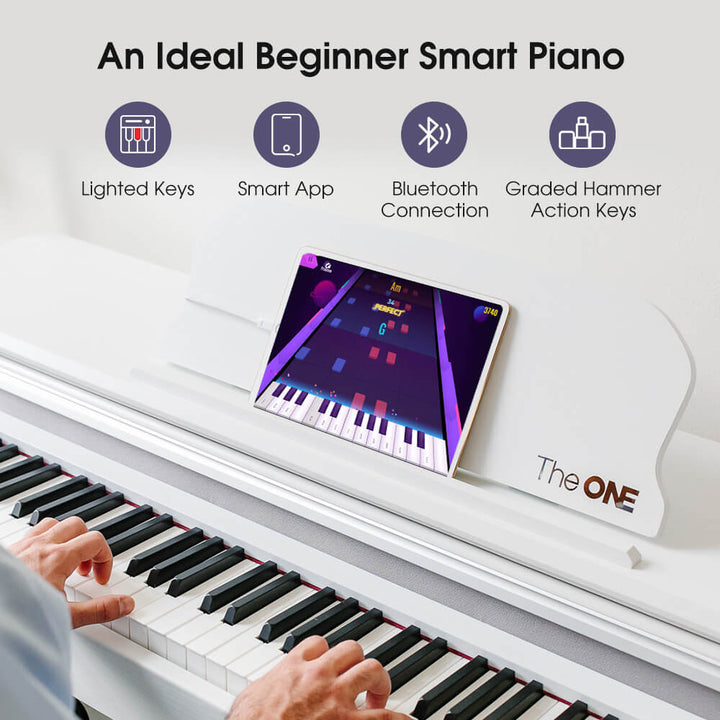
The ONE Music’s current consumer catalog includes several smart pianos, and the The ONE PLAY is one example of an 88-key graded hammer action home piano with LED guidance and the Smart App.
Here is a simple way to think about the core items.
- Instrument: an 88-key weighted or hammer action piano that feels consistent from lesson to lesson.
- Seating: a bench that lets you and your student sit at a relaxed height; The ONE offers a Classic Piano Bench and a Folding X-Style Piano Bench.
- Headphones: useful for quiet practice, duet listening, and not disturbing neighbors.
- Camera or music stand: helpful for video lessons, recitals, or clean sheet-music placement.
For broader context on instrument care and setup, the Piano Technicians Guild is a solid reference, and the National Association of Music Merchants tracks industry trends that can help you understand where smart pianos fit.
Once those basics are stable, you can refine the room itself. Good lighting, a clear sightline to the keys, and a place to store method books keep the lesson moving. If you teach online as well as in person, test the camera angle before you commit to a desk or shelf. A small studio works best when every item earns its place.

How do lighted keys and the consumer app fit into a lesson?
They help in lessons, but they do not replace your ear.
Light guidance can make a new piece feel approachable, especially for beginners still learning key geography.
The trade-off is that lights show where to press, while you still teach how to listen, shape phrases, and build technique. In a private lesson, you might use the lights for a quick warm-up, then turn them off so the student reads notation. The consumer app can support practice at home, but it does not grade expression or posture. Your role stays central: you hear the difference between a correct note and a musical one.
A useful pattern is to start with the lights for orientation, then remove them for memory work. For example, let the student find the pattern once with LED guidance, then ask them to play the same phrase with the lights off and name the notes. That small sequence keeps the tool from becoming a crutch, and it gives you clear evidence of what the student actually knows.
Because the app and the instrument are part of the same consumer ecosystem, you can keep the same account and settings for each lesson. If you connect the piano to recording or teaching software, remember that MIDI carries data, not audio, so your setup may need both a MIDI path and an audio path. The MIDI Association overview is useful background before you add gear.
Can a teacher and student share one instrument?
Sometimes, but two pianos are often clearer for real duets.
Sharing can work for demonstration, call-and-response, or taking turns, but not always for independent parts.
The complication is that two ordinary headphone outputs usually carry the same mix, so each player may not hear a separate part. The ONE’s existing guide on split mode and dual headphone jacks explains which current models have which jack arrangements, and the article Can two people play one digital piano covers the same-register question in more depth.
For a home studio, the practical rule is simple. If you are demonstrating a short passage, one piano is fine. If you are rehearsing a duet with independent parts, or teaching two students at once, plan on two instruments so each player has a full range and a clear listen.
Before you buy, write down the exact lesson you want to run. If the goal is a call-and-response warm-up, one instrument and one pair of headphones may be enough. If the goal is a duet with separate left and right hand parts, check the jack layout and split behavior on the model page, then decide whether a second instrument is the cleaner path.
When do you not need The ONE Classroom?
One-student lessons usually do not need the Classroom lab.
Classroom is a group teaching offer, so compare it to your real lesson format before you budget.
The ONE Music describes Classroom as a group teaching solution for piano studios and music schools, with lessons “from 1:4 to 1:16” and “a starting fee of $10,000-$20,000 per classroom.” That is a different purchase from furnishing a home teaching corner, and it is aimed at a different teaching model.
Official pages also describe reach in two wordings, so keep both in mind rather than treating one as final:
| Source | Official wording |
|---|---|
| Classroom page | “more than 5,000 piano studios/music schools worldwide” and “Trusted by 5000+ schools & music centers worldwide” |
| About page timeline (July entry) | “more than 4,000 piano studios/music schools globally” |
If your plan is one-to-one teaching at home, a consumer smart piano plus seating, headphones, and a camera or stand is usually the closer match. If you are weighing group formats, the smart piano classroom explainer gives the official picture.
Keep the conflict visible in your notes rather than smoothing it over. If a colleague quotes one number, you can show both official wordings and let the reader decide which page they trust. The same discipline applies to pricing: the Classroom starting fee is a range, not a per-seat price, so ask for a current written quote before you compare it to a single home instrument.
If you do want the Classroom offer, how do you start?
Use the official Classroom page and education email.
Start with the official channels, then confirm any detail that affects your teaching space.
The ONE Music directs Classroom and education inquiries to the Classroom page and to classroom@theonemusic.com. The The ONE Music School page is also an official starting point for understanding the program.
Do not rely on third-party dealer claims or unlisted school names. For general guidance on buying carefully and checking official sources, USA.gov is a sensible consumer reference. If a detail matters to you, such as kit contents or classroom computer counts, ask The ONE directly rather than assuming.
When you write to classroom@theonemusic.com, include the facts that change the answer: how many students you teach at once, whether they are children or adults, and whether you already own consumer pianos. Ask for the current Classroom starting fee in writing, and ask which items are included so you can compare the offer to your present setup. Keep the email thread, because it becomes your reference if the program details change later.
How do you choose a digital piano for private piano teacher studio use?
Match the instrument to your teaching, not a feature list.
Review the current catalog, then test the action and key count against your repertoire.
The ONE Music’s current consumer catalog includes the 61-key COLOR, the SING and SING Pro, the 88-key PLAY, and the TOP1X and TOP2 smart pianos. Prices change, so check the live product pages for today’s USD pricing rather than relying on a number you saw elsewhere. The smart piano collection and the smart piano overview are good places to compare.
For a private home studio, ask three questions. Does the instrument have 88 keys if your students are working standard repertoire? Does the action feel consistent under your hands? And can you add the bench, headphones, and stand you need without guessing at compatibility? The MIDI Association overview is useful background if you plan to connect the piano to recording or teaching software, since MIDI carries data, not audio.
Write your answers in one line, then compare models against that line. A 61-key option may be fine for theory games or young beginners, while an 88-key hammer action piano fits graded repertoire and recital preparation. If you already own a bench or headphones, note the connector type and whether the model supports the listening mode you want, so the purchase solves a real problem instead of adding a drawer of adapters.

FAQ
Can I use a consumer smart piano to teach private students at home?
Yes. A current consumer smart piano can work well for one-student lessons in a home studio. You are not required to buy the separate Classroom lab offer to teach privately. Focus on an 88-key instrument with a reliable action, plus seating and headphones. This page covers The ONE Music’s own catalog and official offers only, so confirm any model detail on the product page before you buy.
Do I need The ONE Classroom if I only teach one student at a time?
Usually no. The ONE Music describes Classroom as a group teaching offer for studios and schools, with lessons from 1:4 to 1:16 and a starting fee of $10,000-$20,000 per classroom. A private teacher working one-on-one at home generally needs a single good instrument, a bench, and headphones. If you later move to group teaching, the official Classroom page can explain that separate offer.
Can a teacher and a student share one digital piano for a duet?
Sometimes, but it depends on the piece. Sharing one instrument is fine for demonstration or taking turns. For true duet work with independent parts, two instruments are often clearer, because two ordinary headphone outputs usually carry the same mix. Check The ONE’s existing guide on split mode and dual headphone jacks for the current model details before you plan a lesson around shared listening.
Do lighted keys and the app replace a piano teacher?
No. Lighted keys and the consumer app are useful tools, not a substitute for your ear. Lights can show where to press, but they do not judge tone, phrasing, posture, or effort. In a private lesson, you can use the lights for a warm-up, then turn them off so the student reads notation. Your listening and feedback remain the core of the teaching.
How do I ask The ONE about a classroom or school setup?
Use the official channels only. The ONE Music lists classroom@theonemusic.com for Classroom and education inquiries, and the Classroom page explains the group offer. Do not rely on dealer names, school names, or kit details that are not published officially. If a specification matters to you, such as classroom computer counts or kit contents, ask The ONE directly rather than assuming.
Next step
If you teach one-on-one, start with a current consumer smart piano that feels right in your hands, then add the bench, headphones, and stand your lessons actually use. If you are curious about the group teaching path, read the official Classroom page and the existing smart piano classroom explainer, and browse the The ONE PLAY product page or the smart piano collection at your own pace.
Explore The ONE Music’s current consumer smart pianos, or contact classroom@theonemusic.com if you want to ask about the separate Classroom offer for group teaching.