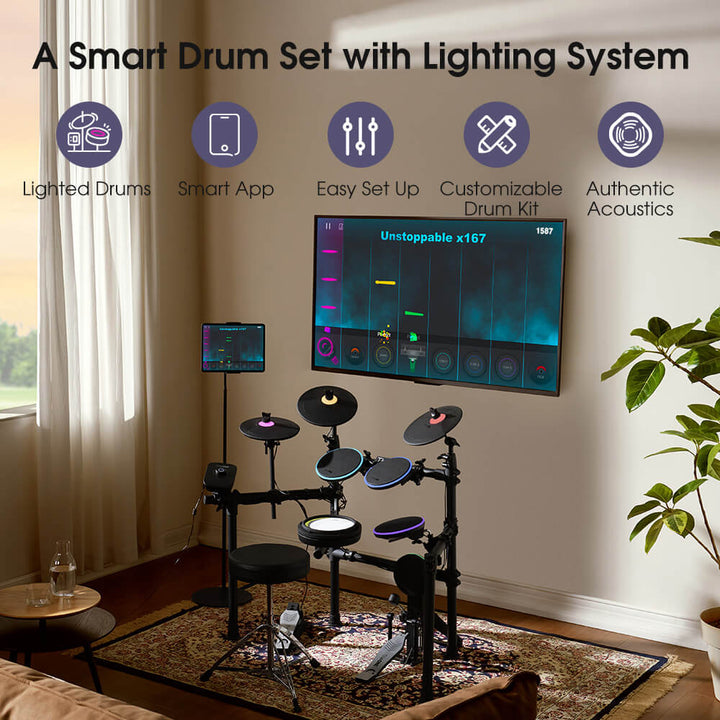
Electronic drums have one advantage over every other instrument in the house: the kit can see exactly what was played. The InstaDrum app is what turns that capability into lessons, which is why the software matters more here than it does on a piano.
Annual Premium details are on the InstaDrum App Annual Premium Membership page.
This guide covers what the app teaches, how the kit and the app hand information to each other, which of the two drum kits suits which kind of player, and the setup details that decide whether the first session works.
Short version: the app is free to download, and the kit is what unlocks the guided lessons rather than the other way round.
What is the InstaDrum app?
The drum learning app that runs TheONE's electronic kits.

TheONE's free drum learning app, which pairs with the TRD roll-up kit and the Polaris drum set and responds to every strike in real time.
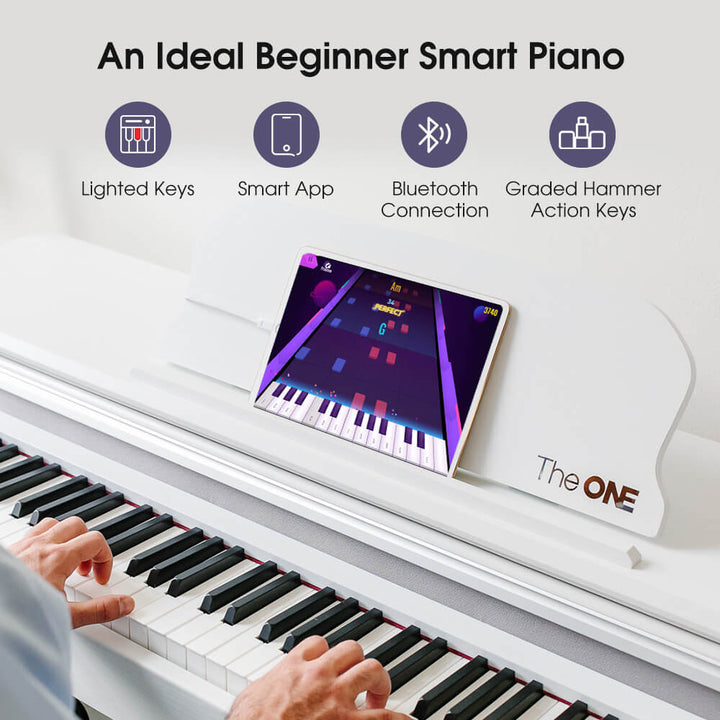
It is TheONE's own software, offered free and downloadable from the InstaDrum page on this site. It pairs with the two drum products in the range, the TRD roll-up kit and the Polaris drum set, and it uses the same principle as the piano app: the instrument reports every strike, and the software responds in real time.
One detail is worth stating plainly, because it is often glossed over. The app can be installed without a drum kit, but without a TheONE kit only some of the free content is accessible. The lessons and the light-guided play are built around the hardware.
The product page describes the content as coming from drum performers, clinicians and session musicians, and the app is designed to visualise progress so that practice has a visible direction rather than a vague sense of improvement.
What does it actually teach?
Reading, timing and coordination, with feedback per strike.
Reading drum notation, playing to a fixed pulse, coordinating four limbs and playing along with songs, with feedback on each strike as it happens.
- Reading. Drum notation in Staff Mode, which is where most self-taught drummers have a gap.
- Timing and subdivision. Playing to a fixed pulse, which the app supplies rather than the player.
- Limb coordination. The part that makes drums feel impossible at first, because four limbs are doing different things at different times.
- Playing along. Real songs, which is what most people actually bought the kit for.
Being honest about the limits is just as useful. An app cannot see your posture, your stick grip, or how hard you are hitting, and it cannot tell you that your wrist is doing the work your fingers should do. It also cannot teach dynamics the way an acoustic kit does, where volume is a physical consequence rather than a number in a sample. Those stay with a teacher, which is the same division of labour that applies to learning drums at home.
What the app does remove is the cost of being wrong. Beginners who play alone tend to continue after a mistake without noticing it, because there is nothing to compare against. A hit that is visibly early or late, or a stroke landing on the wrong pad, is corrected in the moment instead of a week later. That is the same principle of short loops with immediate feedback that Edutopia describes for skills practice generally.
How do the kit and app work together?
The kit sends each hit; the app answers with feedback.
The kit reports each strike over Bluetooth, and the app answers with lights on the pad, a score on screen and a note-by-note record of what you hit.

Both kits connect over Bluetooth, which is specified for iOS 15.6 or later and Android 7.0 or later, with a wired option on Android 7.0 or later through USB Host or OTG. The TRD specification lists dual Bluetooth, which is what allows streamed backing audio and the app connection to run at the same time rather than one at the expense of the other. Bluetooth itself is maintained by the Bluetooth SIG, and modules that exchange note data with software do so using MIDI.
The Polaris kit goes further in one specific way. Its lights are built into each drum and cymbal, so the guidance appears on the pad that is about to be hit rather than on a screen the player is looking at from the wrong angle. The TRD takes a different approach with a lit pad face on a roll-up unit. In both cases the light is a rehearsal aid, and the moment you want to test yourself is the moment to turn it off.
TRD or Polaris: which one suits which player
| TRD (TRD1) | Polaris (TOD1) | |
|---|---|---|
| Format | 9-pad roll-up, 2.2 lbs, 21.9 x 14.7 x 1.7 in | Full kit on a pre-installed rack |
| Pads | 5 drums and 4 cymbals | 1 mesh snare, 3 toms, 1 bass drum, 3 cymbals |
| In the box | Roll-up pad, external pedal supported | Rack, two foot pedals, drumsticks, headphones |
| Sound library | 10 drum kits, 10 built-in songs, 10 accompaniment tracks | 308 sounds |
| Strength | Travel, small flats, silent practice anywhere | A kit that behaves like a kit, including mesh heads |
The TRD is the one that ends up being played, in the specific case where the alternative was nothing at all: it rolls up, it weighs almost nothing, and it fits on a desk. The Polaris is for players who have decided drums are the instrument and want a hierarchy of pads rather than a flat surface. Details and current specifications are on the TRD product page and the Polaris product page.
Whatever the kit, the noise question comes before the playing question in a flat. Mesh heads and rubber pads reduce the impact noise but not the strike of the stick, which is what neighbours hear, and the practical mitigation is a mat plus a sensible practice window. Both are covered in the quiet drum set guide.
Something else decides which kit gets played, and it is rarely mentioned in reviews. A kit that takes ninety seconds to set up gets used on a weekday evening; a kit that takes fifteen minutes gets used at weekends, which in practice means it gets used rarely. If your practice time is short and irregular, the roll-up kit wins on that alone, whatever the specification says. The full kit is the better instrument and the better teacher, but only if it lives assembled and ready, which means you need the floor space before you need the budget.
What you need before the first session
Check the phone version first, because it is the most common reason a kit never appears in the app. iOS 15.6 or later, or Android 7.0 or later, for Bluetooth. Then install the app, pair the kit from inside the app rather than from the phone's Bluetooth settings, and check that the pad you hit is the pad the app reports.
Two things are worth buying before they are needed. Closed-back headphones, because drums are loud in a way that pianos are not and hearing damage is cumulative; the NIDCD guidance on noise-induced hearing loss and the WHO listening-safety programme both describe the mechanism plainly, and drummers sit directly in front of it. And a throne set at a height where the knees sit slightly below the hips, because posture problems are the ones that take months to notice.
Finally, decide how you will measure progress, because drums are unusually easy to practise without improving. The app tracks lessons and scores, which is a reasonable proxy, but the more useful measure for a beginner is how long you can hold a steady beat against a metronome before it drifts. Ten seconds at a slow tempo on the first week and a minute on the fourth is real, visible progress, and it is more motivating than a completion percentage. Write it down somewhere, because the improvement is too gradual to notice while you are inside it.
Check the exact kit before installing the app
Start with the model name on the kit, the current app listing and the instructions for that kit. An app download alone does not prove that every lesson or connection feature works with a particular drum module. Test a pad strike, sound output and lesson response before relying on it for a practice routine.
The InstaDrum overview is the place to identify the supported learning system. If pairing fails, note the phone operating system and app version before contacting support. The Apple app permission guide shows common iPhone settings; review the equivalent controls in Android settings.
Is there a free drum app available?
There are free drum learning apps, but compatibility and included lessons vary. Confirm the current InstaDrum listing, any account requirements and what the kit can do without a subscription before choosing a practice path.
Use one short lesson as a test: can you hear the click, see the prompt and register every pad at a comfortable volume? If the app shows a miss when the pad sounded, troubleshoot the connection before repeating the exercise. The MIDI Association overview helps separate performance data from finished audio.

First-session troubleshooting table
Change one variable at a time. A missing pad signal, silent headphones and an unavailable song can come from different parts of the setup. Record the exact message and model before trying a reset.
| Symptom | First check | Next step |
|---|---|---|
| No pad response | Kit power and app connection | Test one pad locally |
| Silent lesson | Phone and kit audio route | Lower levels, reconnect |
| Song unavailable | Account and connection | Check current app terms |
FAQ
Is the InstaDrum app free?
Yes, it is free to download from the app page on this site. Some free content is available without a kit, but the guided lessons and the light-based play are designed around a TheONE drum kit and need the hardware to work. That division is worth understanding before buying: the app is not a standalone course you can run on a tablet, it is the software half of a two-part product. If you already own a TheONE kit, the app adds nothing to the cost of the kit itself.
Do I need a TheONE drum kit to use it?
For the full experience, yes. The kit reports each strike to the app, and that connection is what allows the lights to guide the next hit and the feedback to be immediate rather than retrospective. Without a kit the app has nothing to respond to, so the lessons and the play-along features are unavailable. Some special free content can be accessed without a TheONE kit, but treating that as the product is a mistake, because the value comes from the pairing rather than from either half separately.
Does it work on both iPhone and Android?
Yes, subject to version. The Bluetooth connection is specified for iOS 15.6 or later and Android 7.0 or later, with a wired USB option on Android 7.0 or later through USB Host or OTG. On drums the connection quality matters more than on a piano, because a lag of even a few milliseconds is audible when you are striking a pad, and it shows up as hits that feel early or late rather than as dropped notes. If that happens, moving the phone closer to the module and closing background apps usually settles it.
Can the app teach me to read drum notation?
Yes. Staff Mode presents the notation alongside the playing, which is the usual gap for drummers who learned by ear, and the lights connect each written position to a physical pad. What it cannot do is replace slow repetition away from the songs, because reading fluently is a separate skill from playing along. The sensible split is to use a song to make the notation meaningful and then spend five minutes reading a printed page without the kit at all, counting it through rather than playing it.
Next step
Install the app, pair the kit inside it, and play one song badly to confirm that every pad registers. Fixing the connection before starting the lessons saves a week of wondering whether the problem is you or the hardware.
See the electronic drum kits that ship with the learning app included.
Explore more on this topic: Visit our Electronic Drums: How to Choose, Set Up and Practise at Home.